
User
A user is an identity that is able to authenticate into a Bondy Realm.
Description
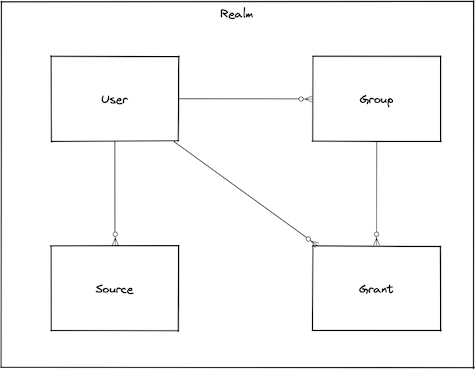
A User is a person or software agent who wants to access a Realm. It can be authenticated and authorized; permissions (authorization) may be granted directly or via Group membership.
Users have attributes associated with themselves like username or aliases, credentials (password or authorized keys) and metadata determined by the client applications.
When you create a user, you then have to grant it permissions by making it a member of a user Group that has appropriate permission attached (recommended), or by directly attaching permissions to the user. You also have to define one or more Sources which define the required authentication methods contextual to the user network location.
Reserved Names
The following names are reserved and Bondy will not allow them to be used as a value for the user's username property: all, anonymous, any, from, on, to.
Aliasing
Provides the ability for a user to authenticate using different usernames (authid). A user can have a maximum of 5 aliases.
Types
input_data()
The object used to create or update a user.
The object represents an overview of all the user properties; the available properties are detailed for each particular operation.
usernameThe user identifier.
groupsA list of group names.
sso_realm_uriIf present, this it the URI of the SSO Realm where the user is auhenticated. Once a user has been associated with an SSO realm it cannot be changed.
enabledIf the user is enabled or not.
truemetaUser metadata.
{}passwordThe user password.
authorized_keysThe authorized keys.
user()
The representation of the user returned by the read or write operations e.g. get, list, add or update.
usernameThe user identifier.
groupsA list of group names.
sso_realm_uriIf present, this it the URI of the SSO Realm where the user is auhenticated. Once a user has been associated with an SSO realm it cannot be changed.
enabledIf the user is enabled or not.
truemetaUser metadata.
{}aliasesThe list of aliases.
authorized_keysThe authorized keys.
has_passwordIf the user has a password.
has_authorized_keysIf the user has an authorized keys.
Procedures
| Name | URI |
|---|---|
| Add a user to a realm | bondy.user.add |
| Update a user in a realm | bondy.user.update |
| Delete a user from a realm | bondy.user.delete |
| Enable a user in a realm | bondy.user.enable |
| Disable a user in a realm | bondy.user.disable |
| Check if a user is enabled | bondy.user.is_enabled |
| Retrieve a user from a realm | bondy.user.get |
| List all users from a realm | bondy.user.list |
| Change the user password | bondy.user.change_password |
| Add an alias to a user | bondy.user.add_alias |
| Remove an alias from a user | bondy.user.remove_alias |
| Add a group to a user | bondy.user.add_group |
| Add groups to a user | bondy.user.add_groups |
| Remove a group from a user | bondy.user.remove_group |
| Remove groups from a user | bondy.user.remove_groups |
Creating, updating, and deleting
Add a user to a realm
bondy.user.add(realm_uri(), input_data()) -> user()
Creates a new user and add it on the provided realm uri.
Publishes an event under topic bondy.user.added after the user has been created.
Call
Positional Args
0The URI of the realm you want to add a user.
1The user configuration data
Keyword Args
None.
Result
Positional Results
0The created user.
Keyword Results
None.
Errors
- bondy.error.already_exists: when the provided username already exists.
- bondy.error.missing_required_value: when a required value is not provided
- bondy.error.unknown_error with
codeinvalid_datatype: when the data type is invalid. See invalid_datatype. - bondy.error.invalid_value: when the data value is invalid
- bondy.error.invalid_data: when the data values are invalid
- bondy.error.internal_error: when any of the provided group name doesn't exist. Bondy 1.0.0 returns this URI in place of
bondy.error.no_such_groups. - bondy.error.not_found: when the provided realm uri is not found.
- wamp.error.invalid_argument: for example when the provided
sso_realm_uriproperty value doesn't exist.
Examples
./wick --url ws://localhost:18080/ws --realm com.leapsight.bondy \
call bondy.user.add \
"com.leapsight.test_creation_1" '{"username":"user_1"}' | jq{
"authorized_keys": [],
"enabled": true,
"groups": [],
"has_authorized_keys": false,
"has_password": false,
"meta": {},
"sso_realm_uri": null,
"type": "user",
"username": "user_1",
"version": "1.1"
}./wick --url ws://localhost:18080/ws --realm com.leapsight.bondy \
call bondy.user.add \
"com.leapsight.test_creation_1" '{"username":"user_3", "groups":["group_1"], "password":"my_password"}' | jq{
"authorized_keys": [],
"enabled": true,
"groups": [
"group_1"
],
"has_authorized_keys": false,
"has_password": true,
"meta": {},
"sso_realm_uri": null,
"type": "user",
"username": "user_3",
"version": "1.1"
}Update a user in a realm
bondy.user.update(realm_uri(), username(), input_data()) -> user()
Updates an existing user.
Publishes an event under topic bondy.user.updated after the user has been updated. Optionally, publishes an event under topic bondy.user.credentials_changed if the user's authorized_keys have been changed.
Call
Positional Args
0The URI of the realm you want to modify a user.
1The username or uuid of the user you want to update.
2The user configuration data
Keyword Args
None.
Result
Positional Results
0The updated user.
Keyword Results
None.
Errors
- bondy.error.missing_required_value: when a required value is not provided
- bondy.error.unknown_error with
codeinvalid_datatype: when the data type is invalid. See invalid_datatype. - bondy.error.invalid_value: when the data value is invalid
- bondy.error.invalid_data: when the data values are invalid
- bondy.error.internal_error: when any of the provided group name doesn't exist. Bondy 1.0.0 returns this URI in place of
bondy.error.no_such_groups. - wamp.error.no_such_principal: when the provided username does not exist.
- wamp.error.invalid_argument: for example when the provided
sso_realm_uriproperty value doesn't exist.
Examples
./wick --url ws://localhost:18080/ws --realm com.leapsight.bondy \
call bondy.user.update \
"com.leapsight.test_creation_1" "user_3" \
'{
"groups":["group_1","group_2"],
"enabled":true,
"authorized_keys":["1766c9e6ec7d7b354fd7a2e4542753a23cae0b901228305621e5b8713299ccdd"]
}' | jq{
"aliases": [
"user3_alias5",
"user3_alias4",
"user3_alias3",
"user3_alias2",
"user3_alias1"
],
"authorized_keys": [
"1766C9E6EC7D7B354FD7A2E4542753A23CAE0B901228305621E5B8713299CCDD"
],
"enabled": true,
"groups": [
"group_1",
"group_2"
],
"has_authorized_keys": true,
"has_password": true,
"meta": {},
"sso_realm_uri": null,
"type": "user",
"username": "user_3",
"version": "1.1"
}Success Call checking if the new keys were changed
- Request
./wick --url ws://localhost:18080/ws \
--realm com.leapsight.test_creation_1 \
--authmethod=cryptosign --authid="user_3" --private-key="4ffddd896a530ce5ee8c86b83b0d31835490a97a9cd718cb2f09c9fd31c4a7d7" \
call bondy.user.get "com.leapsight.test_creation_1" "user_3" | jq- Response
{
"aliases": [
"user3_alias5",
"user3_alias4",
"user3_alias3",
"user3_alias2",
"user3_alias1"
],
"authorized_keys": [
"1766C9E6EC7D7B354FD7A2E4542753A23CAE0B901228305621E5B8713299CCDD"
],
"enabled": true,
"groups": [
"group_1",
"group_2"
],
"has_authorized_keys": true,
"has_password": true,
"meta": {},
"sso_realm_uri": null,
"type": "user",
"username": "user_3",
"version": "1.1"
}Delete a user from a realm
bondy.user.delete(realm_uri(), username())
Deletes the requested username from the provided realm uri.
Publishes an event under topic bondy.user.deleted after the user has been deleted.
Call
Positional Args
0The URI of the realm you want to delete the user.
1The username of the user you want to delete.
Keyword Args
None.
Result
Positional Results
None.
Keyword Results
None.
Errors
- wamp.error.no_such_principal: when the provided username does not exist.
- bondy.error.conflict: when the realm is an SSO realm and other realms hold a local user of the same name that links to this realm as its SSO realm. The error's
details.realmslists the URIs of those realms. The router removes nothing. Delete the user from the listed realms first.
Examples
./wick --url ws://localhost:18080/ws --realm com.leapsight.bondy \
call bondy.user.delete "com.leapsight.test_creation_1" "user_1"Enabling and disabling
Enable a user in a realm
bondy.user.enable(realm_uri(), username())
Enables the requested username on the provided realm uri.
Call
Positional Args
0The URI of the realm you want to enable the user.
1The username of the user you want to enable.
Keyword Args
None.
Result
Positional Results
None.
Keyword Results
None.
Errors
Examples
./wick --url ws://localhost:18080/ws --realm com.leapsight.bondy \
call bondy.user.enable "com.leapsight.test_creation_1" "user_1"Disable a user in a realm
bondy.user.disable(realm_uri(), username())
Disables the requested username on the provided realm uri.
Call
Positional Args
0The URI of the realm you want to disable the user.
1The username of the user you want to disable.
Keyword Args
None.
Result
Positional Results
None.
Keyword Results
None.
Errors
Examples
./wick --url ws://localhost:18080/ws --realm com.leapsight.bondy \
call bondy.user.disable "com.leapsight.test_creation_1" "user_1"Check if a user is enabled
bondy.user.is_enabled(realm_uri(), username()) -> boolean()
Checks if the requested username on the provided realm uri is enabled.
Call
Positional Args
0The URI of the realm you want to check the user.
1The username of the user you want to check if is enabled.
Keyword Args
None.
Result
Positional Results
The call result is a single positional argument: true when the user is enabled, false otherwise.
Keyword Results
None.
Errors
- wamp.error.invalid_argument: when there is an invalid number of positional arguments.
- wamp.error.no_such_principal: when the provided username does not exist.
Examples
./wick --url ws://localhost:18080/ws --realm com.leapsight.bondy \
call bondy.user.is_enabled "com.leapsight.test_creation_1" "user_1"trueQuerying
Retrieve a user from a realm
bondy.user.get(realm_uri(), username()) -> user()
Retrieves the requested username on the provided realm uri.
Call
Positional Args
0The URI of the realm you want to retrieve the user.
1The username of the user you want to retrieve.
Keyword Args
None.
Result
Positional Results
The call result is a single positional argument containing a user:
usernameThe user identifier.
groupsA list of group names.
sso_realm_uriIf present, this it the URI of the SSO Realm where the user is auhenticated. Once a user has been associated with an SSO realm it cannot be changed.
enabledIf the user is enabled or not.
truemetaUser metadata.
{}aliasesThe list of aliases.
authorized_keysThe authorized keys.
has_passwordIf the user has a password.
has_authorized_keysIf the user has an authorized keys.
Keyword Results
None.
Errors
- bondy.error.not_found: when the provided username is not found.
Examples
./wick --url ws://localhost:18080/ws --realm com.leapsight.bondy \
call bondy.user.get "com.leapsight.test_creation_1" "user_1" | jq{
"authorized_keys": [],
"enabled": true,
"groups": [],
"has_authorized_keys": false,
"has_password": false,
"meta": {},
"sso_realm_uri": null,
"type": "user",
"username": "user_1",
"version": "1.1"
}List all users from a realm
bondy.user.list(realm_uri()) -> [user()]
Lists all users of the provided realm uri.
Call
Positional Args
0The URI of the realm you want to retrieve the users.
Keyword Args
None.
Result
Positional Results
The call result is a single positional argument containing a list of users. An empty list is returned when the provided realm uri doesn't exist.
0The users of the realm you want to retrieve.
Keyword Results
None.
Errors
None.
Examples
./wick --url ws://localhost:18080/ws --realm com.leapsight.bondy \
call bondy.user.list \
"com.leapsight.test_creation_1" | jq[
{
  "authorized_keys": [],
  "enabled": true,
  "groups": [],
  "has_authorized_keys": false,
  "has_password": false,
  "meta": {},
  "sso_realm_uri": null,
  "type": "user",
  "username": "user_1",
  "version": "1.1"
},
{
"authorized_keys": [],
"enabled": true,
"groups": [
"group_1"
],
"has_authorized_keys": false,
"has_password": false,
"meta": {},
"sso_realm_uri": null,
"type": "user",
"username": "user_2",
"version": "1.1"
},
{
  "authorized_keys": [],
  "enabled": true,
  "groups": [
    "group_1"
  ],
  "has_authorized_keys": false,
  "has_password": true,
  "meta": {},
  "sso_realm_uri": null,
  "type": "user",
  "username": "user_3",
  "version": "1.1"
}
]Managing the password
Change the user password
bondy.user.change_password(realm_uri(), username(), new_password()[, old_password()])
Changes the password of an existing user.
Publishes an event under topic bondy.user.credentials_changed after the user's password has been changed.
Call
Positional Args
The operation supports 3 or 4 positional arguments. The realm URI is required. Bondy does not default it to the caller's realm, because the procedure also takes an optional trailing argument.
0The URI of the realm you want to to modify the user password.
1The username of the user you want to update the password.
2The new password.
3The old password.
Keyword Args
None.
Result
Positional Results
None.
Keyword Results
None.
Errors
- bondy.error.internal_error: when the provided old password doesn't match. Bondy 1.0.0 returns this URI in place of
bondy.error.bad_signature. - wamp.error.invalid_argument: when there is an invalid number of positional arguments.
- bondy.error.not_found: when the provided username does not exist.
Examples
./wick --url ws://localhost:18080/ws --realm com.leapsight.bondy \
call bondy.user.change_password \
"com.leapsight.test_creation_1" "user_3" "my_new_password"./wick --url ws://localhost:18080/ws \
--realm com.leapsight.test_creation_1 \
--authmethod=wampcra --authid="user_3" --secret="my_new_password" \
call bondy.user.get "com.leapsight.test_creation_1" "user_3" | jq{
"aliases": [
"user3_alias5",
"user3_alias4",
"user3_alias3",
"user3_alias2",
"user3_alias1"
],
"authorized_keys": [
"1766C9E6EC7D7B354FD7A2E4542753A23CAE0B901228305621E5B8713299CCDD"
],
"enabled": true,
"groups": [
"group_1",
"group_2"
],
"has_authorized_keys": true,
"has_password": true,
"meta": {},
"sso_realm_uri": null,
"type": "user",
"username": "user_3",
"version": "1.1"
}./wick --url ws://localhost:18080/ws --realm com.leapsight.bondy \
call bondy.user.change_password \
"com.leapsight.test_creation_1" "user_3" "my_new_password" "my_password"Managing aliases
Add an alias to a user
bondy.user.add_alias(realm_uri(), username(), alias())
Adds an alias to an existing user.
If the user is an SSO user, the alias is added on the SSO Realm only.
Call
Positional Args
0The URI of the realm you want to modify the user.
1The username of the user you want to add an alias.
2The alias to add.
Keyword Args
None.
Result
Positional Results
None.
Keyword Results
None.
Errors
- wamp.error.invalid_argument: when there is an invalid number of positional arguments.
- wamp.error.no_such_principal: when the provided username does not exist.
- bondy.error.property_range_limit: when the value for property 'alias' already contains the maximum number of values allowed (5).
- bondy.error.invalid_value: when the alias is not a valid username.
- bondy.error.already_exists: when a user or another alias in the realm already uses the name.
Examples
./wick --url ws://localhost:18080/ws --realm com.leapsight.bondy \
call bondy.user.add_alias \
"com.leapsight.test_creation_1" "user_3" "user3_alias1"./wick --url ws://localhost:18080/ws --realm com.leapsight.bondy \
call bondy.user.get "com.leapsight.test_creation_1" "user_3" | jq{
"aliases": [
"user3_alias1"
],
"authorized_keys": [],
"enabled": true,
"groups": [
"group_1"
],
"has_authorized_keys": false,
"has_password": true,
"meta": {},
"sso_realm_uri": null,
"type": "user",
"username": "user_3",
"version": "1.1"
}./wick --url ws://localhost:18080/ws \
--realm com.leapsight.test_creation_1 \
--authmethod=wampcra --authid="user3_alias1" --secret="my_password" \
call bondy.user.get "com.leapsight.test_creation_1" "user_3" | jq{
"aliases": [
"user3_alias1"
],
"authorized_keys": [],
"enabled": true,
"groups": [
"group_1"
],
"has_authorized_keys": false,
"has_password": true,
"meta": {},
"sso_realm_uri": null,
"type": "user",
"username": "user_3",
"version": "1.1"
}Remove an alias from a user
bondy.user.remove_alias(realm_uri(), username(), alias())
Removes an existing alias from an existing user.
If the user is an SSO user, the alias is removed from the SSO Realm only.
Removing an alias that the user does not hold succeeds.
Call
Positional Args
0The URI of the realm you want to modify the user.
1The username of the user you want to remove an alias.
2The alias to remove.
Keyword Args
None.
Result
Positional Results
None.
Keyword Results
None.
Errors
- wamp.error.invalid_argument: when there is an invalid number of positional arguments.
- wamp.error.no_such_principal: when the provided username does not exist.
- bondy.error.invalid_value: when the alias is not a valid username.
Examples
./wick --url ws://localhost:18080/ws --realm com.leapsight.bondy \
call bondy.user.remove_alias \
"com.leapsight.test_creation_1" "user_3" "user3_alias1"./wick --url ws://localhost:18080/ws --realm com.leapsight.bondy \
call bondy.user.get "com.leapsight.test_creation_1" "user_3" | jq{
"aliases": [
"user3_alias5",
"user3_alias4",
"user3_alias3",
"user3_alias2"
],
"authorized_keys": [
"1766C9E6EC7D7B354FD7A2E4542753A23CAE0B901228305621E5B8713299CCDD"
],
"enabled": true,
"groups": [
"group_1",
"group_2"
],
"has_authorized_keys": true,
"has_password": true,
"meta": {},
"sso_realm_uri": null,
"type": "user",
"username": "user_3",
"version": "1.1"
}Managing group membership
Add a group to a user
bondy.user.add_group(realm_uri(), username(), group_name())
Adds a group name to an existing user.
Call
Positional Args
0The URI of the realm you want to modify the user.
1The username of the user you want to add a group name.
2The group name to add.
Keyword Args
None.
Result
Positional Results
None.
Keyword Results
None.
Errors
- wamp.error.invalid_argument: when there is an invalid number of positional arguments.
- bondy.error.internal_error: when the provided group name doesn't exist. Bondy 1.0.0 returns this URI in place of
bondy.error.no_such_groups. - wamp.error.no_such_principal: when the provided username does not exist.
Examples
./wick --url ws://localhost:18080/ws --realm com.leapsight.bondy \
call bondy.user.add_group \
"com.leapsight.test_creation_1" "user_3" "group_1"./wick --url ws://localhost:18080/ws --realm com.leapsight.bondy \
call bondy.user.get "com.leapsight.test_creation_1" "user_3" | jq{
"authorized_keys": [],
"enabled": true,
"groups": [
"group_1"
],
"has_authorized_keys": false,
"has_password": true,
"meta": {},
"sso_realm_uri": null,
"type": "user",
"username": "user_3",
"version": "1.1"
}Add groups to a user
bondy.user.add_groups(realm_uri(), username(), [group_name()])
Adds a list of group names to an existing user.
Call
Positional Args
0The URI of the realm you want to modify the user.
1The username of the user you want to add a group names.
2The group names to add.
Keyword Args
None.
Result
Positional Results
None.
Keyword Results
None.
Errors
- wamp.error.invalid_argument: when there is an invalid number of positional arguments.
- bondy.error.internal_error: when any of the provided group names doesn't exist. Bondy 1.0.0 returns this URI in place of
bondy.error.no_such_groups. - wamp.error.no_such_principal: when the provided username does not exist.
Examples
./wick --url ws://localhost:18080/ws --realm com.leapsight.bondy \
call bondy.user.add_groups \
"com.leapsight.test_creation_1" "user_3" '["group_1","group_2"]'./wick --url ws://localhost:18080/ws --realm com.leapsight.bondy \
call bondy.user.get "com.leapsight.test_creation_1" "user_3" | jq{
"authorized_keys": [],
"enabled": true,
"groups": [
"group_1",
"group_2"
],
"has_authorized_keys": false,
"has_password": true,
"meta": {},
"sso_realm_uri": null,
"type": "user",
"username": "user_3",
"version": "1.1"
}Remove a group from a user
bondy.user.remove_group(realm_uri(), username(), group_name())
Removes an existing group name from an existing user.
Call
Positional Args
0The URI of the realm you want to modify the user.
1The username of the user you want to remove a group name.
2The group name to remove.
Keyword Args
None.
Result
Positional Results
None.
Keyword Results
None.
Errors
- wamp.error.invalid_argument: when there is an invalid number of positional arguments.
- wamp.error.no_such_principal: when the provided username does not exist.
Examples
./wick --url ws://localhost:18080/ws --realm com.leapsight.bondy \
call bondy.user.remove_group \
"com.leapsight.test_creation_1" "user_3" "group_1"./wick --url ws://localhost:18080/ws --realm com.leapsight.bondy \
call bondy.user.get "com.leapsight.test_creation_1" "user_3" | jq{
"aliases": [
"user3_alias5",
"user3_alias4",
"user3_alias3",
"user3_alias2",
"user3_alias1"
],
"authorized_keys": [],
"enabled": true,
"groups": [
"group_2"
],
"has_authorized_keys": false,
"has_password": true,
"meta": {},
"sso_realm_uri": null,
"type": "user",
"username": "user_3",
"version": "1.1"
}Remove groups from a user
bondy.user.remove_groups(realm_uri(), username(), [group_name()])
Removes a list of group names from an existing user.
Call
Positional Args
0The URI of the realm you want to modify the user.
1The username of the user you want to remove a group names.
2The group names to remove.
Keyword Args
None.
Result
Positional Results
None.
Keyword Results
None.
Errors
- wamp.error.invalid_argument: when there is an invalid number of positional arguments.
- wamp.error.no_such_principal: when the provided username does not exist.
Examples
./wick --url ws://localhost:18080/ws --realm com.leapsight.bondy \
call bondy.user.remove_groups \
"com.leapsight.test_creation_1" "user_3" '["group_1","group_2"]'./wick --url ws://localhost:18080/ws --realm com.leapsight.bondy \
call bondy.user.get "com.leapsight.test_creation_1" "user_3" | jq{
"aliases": [
"user3_alias5",
"user3_alias4",
"user3_alias3",
"user3_alias2",
"user3_alias1"
],
"authorized_keys": [],
"enabled": true,
"groups": [],
"has_authorized_keys": false,
"has_password": true,
"meta": {},
"sso_realm_uri": null,
"type": "user",
"username": "user_3",
"version": "1.1"
}Topics
bondy.user.added
Positional Results
0The username of the user you have added.
Keyword Results
None.
bondy.user.updated
Positional Results
0The realm uri.
1The username of the user you have updated.
Keyword Results
None.
bondy.user.credentials_changed
Positional Results
0The realm uri.
1The username of the user you have changed its credentials.
Keyword Results
None.
bondy.user.deleted
Positional Results
0The realm uri.
1The username of the user you have deleted.
Keyword Results
None.