
Source
Source is an access control rule used to restrict access based for a user based on the combination of the incoming IP address (CIDR masks) and the authentication method being used.
Description
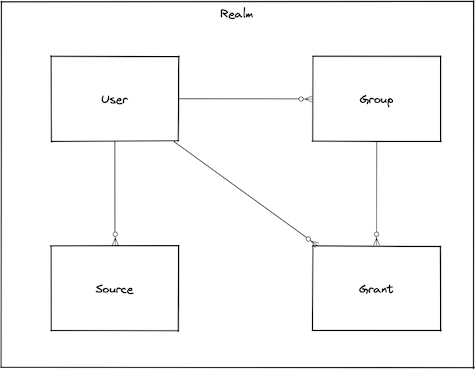
While user management enables you to control authorization with regard to users, security sources provide you with an interface for managing means of authentication. If you create users and grant them access to some or all of Bondy's functionality, you will then need to define security sources required for authentication.
Sources are used to define authentication mechanisms. A user cannot be authenticated to Bondy until one or more sources are assigned to it.
Bondy security sources may be applied to a specific user, multiple users, or all users (using the keyword all).
Authentication Methods
Bondy provides various methods of authentication (called authmethods in WAMP).
anonymous
Anonymous authentication allows establishing a session without prompting the user for a username or credentials.
cryptosign
WAMP-Cryptosign is a WAMP authentication method based on public-private key cryptography. Specifically, it is based on Ed25519 digital signatures as described in RFC8032.
Cryptosign vs. Passkey
WAMP-Cryptosign is a passwordless authentication method which is very similar to the new Passkey standard. It uses the same underlying crypto algorithm and principles.
WAMP-cryptosign was defined in the WAMP Protocol Specification way before Passkey was proposed and adopted by key industry players like Apple and Google.
wampcra
WAMP Challenge-Response ("WAMP-CRA") authentication is a simple, secure authentication mechanism using a shared secret i.e. a password. The client and the router share a secret. The secret never travels the wire, hence WAMP-CRA can be used via non-TLS connections.
ticket
With Ticket-based authentication, the client needs to present the router an authentication "ticket". See the Ticket documentation page for more details.
Important
A ticket is issued to a session that has already authenticated, using one of the methods listed in security.ticket.authmethods. A user who obtains tickets therefore needs two sources: one for ticket, and one for the method the user authenticates with to obtain it.
oauth2
With OAuth2-based authentication, the client needs to present the router an authentication "token". See the OAuth2 documentation page for more details.
Important
A token request authenticates the resource owner, and the API client, with the password method. A user who obtains OAuth2 tokens therefore needs two sources: one for password and one for oauth2. See Protecting an HTTP API with OAuth2.
Obtaining an OAuth2 token requires the use of HTTP (Bondy HTTP Gateway). If you are using WAMP mainly, just use ticket
cookie
With cookie-based authentication, the client presents the ticket cookie that the OIDC authorization code flow sets. No challenge is issued.
Important
Sources apply to an OIDC user whether or not Bondy holds a user record for them. A user without a record, because the provider does not set auto_provision, is matched only by sources assigned to all and by the prototype realm's all sources. A source that names users requires those users to exist.
How sources are applied
As mentioned before, when managing security sources you always have the option of applying a source to either a single user, multiple users, or all users. If specific users and all have no sources in common, this presents no difficulty.
When several sources match a user connecting from an address, every matching source counts: a user-specific source does not hide a source assigned to all. Bondy takes the methods named by all matching sources, keeps those the realm allows, and drops any the user cannot satisfy (for example cryptosign for a user with no authorized_keys). The client may use any method left. Take this example, in which a cryptosign source is assigned to all and a wampcra source is assigned to alice:
{
	"usernames": "all",
	"cidr": "127.0.0.1/32",
	"authmethod": "cryptosign"
}{
"usernames": ["alice"],
"cidr": "127.0.0.1/32",
"authmethod": "wampcra"
}When alice connects from an address in 127.0.0.1/32, she may authenticate with wampcra, and also with cryptosign if the realm allows it and her user record has authorized_keys. To restrict a user to one method, make sure no broader source matching that user and address names another method.
Types
input_data()
The object used to create or update a source.
The object represents an overview of all the source properties; the available properties are detailed for each particular operation.
usernamesThe string 'all' or a list of usernames.
cidrA restricted IP/mask
authmethodThe allowed authentication method.
metaSource metadata.
{}source()
The representation of the source returned by the read or write operations e.g. get, list or add.
usernamesThe string 'all' or a list of usernames.
cidrA restricted IP/mask
authmethodThe allowed authentication method.
metaSource metadata.
{}Procedures
| Name | URI |
|---|---|
| Add a source to a realm | bondy.source.add |
| Remove a source from a realm | bondy.source.delete |
| Retrieve a source from a realm (deprecated) | bondy.source.get |
| List all sources from a realm | bondy.source.list |
| Find sources from a realm | bondy.source.match |
Bondy does not publish an event when a source is added or removed.
Creating and removing
Add a source to a realm
bondy.source.add(realm_uri(), input_data()) -> source()
Creates a new source and adds it to the provided realm uri. This operation is idempotent and also works as an update.
Call
Positional Args
0The URI of the realm you want to add the source to.
1The source configuration data
Keyword Args
None.
Result
Positional Results
0The created source.
Keyword Results
None.
Errors
- bondy.error.missing_required_value: when a required value is not provided
- bondy.error.unknown_error with
codeinvalid_datatype: when the data type is invalid. See invalid_datatype. - bondy.error.invalid_value: when the data value is invalid
- bondy.error.invalid_data: when the data values are invalid.
- bondy.error.internal_error: when any of the provided usernames doesn't exist. Bondy 1.0.0 returns this URI in place of
bondy.error.no_such_users. - bondy.error.not_found: when the provided realm uri is not found.
Examples
Success Call
- Request
./wick --url ws://localhost:18080/ws \
--realm com.leapsight.bondy \
call bondy.source.add \
"com.leapsight.test_creation_1" \
'{
	"usernames":["user_1"],
	"authmethod":"password",
	"cidr":"0.0.0.0/0"
}' | jq- Response:
{
  "authmethod": "password",
  "cidr": "0.0.0.0/0",
  "meta": {},
  "type": "source",
  "version": "1.1"
}Remove a source from a realm
bondy.source.delete(realm_uri(), [username()] | all | anonymous, cidr())
Removes an existing source from the provided realm uri.
Call
Positional Args
The operation supports 3 positional arguments with some reserved keys for the second arg (usernames):
0The URI of the realm you want to remove the source.
1The list of usernames of the source you want to remove.
2The cidr of the source you want to remove.
Keyword Args
None.
Result
Positional Results
None.
Keyword Results
None.
Errors
- wamp.error.invalid_argument: when the 3 required parameters are not provided.
Examples
Success Call
- Request
./wick --url ws://localhost:18080/ws \
--realm com.leapsight.bondy \
call bondy.source.delete \
"com.leapsight.test_creation_1" '["user_1"]' "0.0.0.0/0"Querying
Retrieve a source from a realm
bondy.source.get(realm_uri, username, cidr) -> source()
Deprecated
Bondy does not serve this procedure. A call to it, or to its legacy alias bondy.security.find_source, fails with bondy.error.deprecated_procedure.
Use bondy.source.match to get the sources that apply to a user, or bondy.source.list to get every source of a realm.
List all sources from a realm
bondy.source.list(realm_uri()) -> [source()]
Lists all sources of the provided realm uri.
Call
Positional Args
0The URI of the realm you want to retrieve the sources.
Keyword Args
None.
Result
Positional Results
The call result is a single positional argument containing a list of sources. An empty list is returned when the provided realm uri doesn't exist.
0The sources of the realm you want to retrieve.
Keyword Results
None.
Errors
None.
Examples
Success Call
- Request
./wick --url ws://localhost:18080/ws \
--realm com.leapsight.bondy \
call bondy.source.list \
"com.leapsight.test_creation_1" | jq- Response:
[
  {
    "authmethod": "password",
    "cidr": "0.0.0.0/0",
    "meta": {},
    "type": "source",
    "username": "user_1",
    "version": "1.1"
  }
]Find sources from a realm
bondy.source.match(realm_uri(), username()[, ip_address()]) -> [source()]
Returns the sources that apply to username in the realm: the user's own sources, the realm's all sources, and those the realm inherits from its prototype.
Call
Positional Args
The procedure takes the realm URI, a username and an optional IP address. The realm URI is required. Bondy does not default it to the caller's realm, because the procedure also takes an optional trailing argument. A session outside the master realm can match only in its own realm.
0The URI of the realm.
1The username, or all or anonymous.
2The connecting client's IP address. See the warning below.
A connection address cannot be passed over WAMP
The procedure accepts the connecting client's IP address only as an Erlang IP address tuple, which a WAMP client cannot send. Do not pass a third argument.
Keyword Args
None.
Result
Positional Results
The call result is a single positional argument containing a sources:
0The sources of the realm you want to retrieve.
Keyword Results
None.
Errors
- wamp.error.invalid_argument: when the required parameters are not provided.
Examples
Success Call matching the all sources
- Request
./wick --url ws://localhost:18080/ws \
--realm com.leapsight.bondy \
call bondy.source.match "com.leapsight.test_creation_1" "all" | jq- Response
[
  {
    "authmethod": "cryptosign",
    "cidr": "0.0.0.0/0",
    "meta": {
      "description": "Allows all users from any network authenticate using password credentials."
    },
    "type": "source",
    "username": "all",
    "version": "1.1"
  },
  {
    "authmethod": "password",
    "cidr": "0.0.0.0/0",
    "meta": {
      "description": "Allows all users from any network authenticate using password credentials. This should ideally be restricted to your local administrative or DMZ network."
    },
    "type": "source",
    "username": "all",
    "version": "1.1"
  },
  {
    "authmethod": "wampcra",
    "cidr": "0.0.0.0/0",
    "meta": {
      "description": "Allows all users from any network authenticate using password credentials."
    },
    "type": "source",
    "username": "all",
    "version": "1.1"
  }
]Success Call realm and username matching
- Request
./wick --url ws://localhost:18080/ws \
--realm com.leapsight.bondy \
call bondy.source.match "com.leapsight.test_creation_1" "user_1" | jq- Response
[
  {
    "authmethod": "password",
    "cidr": "0.0.0.0/0",
    "meta": {},
    "type": "source",
    "username": "user_1",
    "version": "1.1"
  }
]