
Group
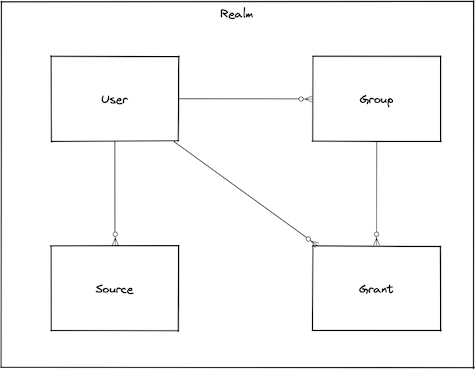
Group is a named collection of user or group identifiers. It can have permissions assigned to them directly or via the group membership, but cannot be authenticated.
Description
You can use user groups to specify permissions for a collection of users, which makes permissions easier to manage for those users. When you grant a permission to a group, all of the users (and groups) in the group are granted that permission (by transitive rule).
Reserved Names
The following names are reserved and Bondy will not allow them to be used as a value for the group's name property: all, anonymous, any, from, on, to.
Types
input_data()
The object used to create or update a group.
The object represents an overview of all the group properties; the available properties are detailed for each particular operation.
nameThe group identifier. This is always in lowercase.
groupsA list of group names.
metaGroup metadata.
{}group()
The representation of the group returned by the read or write operations e.g. get, list, add or update.
nameThe group identifier. This is always in lowercase.
groupsA list of group names.
metaGroup metadata.
{}Procedures
| Name | URI |
|---|---|
| Add a group to a realm | bondy.group.add |
| Update a group in a realm | bondy.group.update |
| Delete a group from a realm | bondy.group.delete |
| Retrieve a group from a realm | bondy.group.get |
| List all groups from a realm | bondy.group.list |
| Add a group to a group | bondy.group.add_group |
| Add groups to a group | bondy.group.add_groups |
| Remove a group from a group | bondy.group.remove_group |
| Remove groups from a group | bondy.group.remove_groups |
Creating, updating, and deleting
Add a group to a realm
bondy.group.add(realm_uri(), input_data()) -> group()
Creates a new group and adds it to the provided realm uri.
Publishes an event under topic bondy.group.added after the group has been created.
Call
Positional Args
0The URI of the realm you want to add a group.
1The group configuration data
Keyword Args
None.
Result
Positional Results
0The created group.
Keyword Results
None.
Errors
- bondy.error.already_exists: when the provided name already exists.
- bondy.error.missing_required_value: when a required value is not provided
- bondy.error.unknown_error with
codeinvalid_datatype: when the data type is invalid. See invalid_datatype. - bondy.error.invalid_value: when the data value is invalid
- bondy.error.invalid_data: when the data values are invalid
- bondy.error.internal_error: when any of the provided group name doesn't exist. Bondy 1.0.0 returns this URI in place of
bondy.error.no_such_groups. - bondy.error.not_found: when the provided realm uri is not found.
Examples
Success Call
- Request
./wick --url ws://localhost:18080/ws \
--realm com.leapsight.bondy \
call bondy.group.add \
"com.leapsight.test_creation_1" '{"name":"group_1"}' | jq- Response:
{
  "groups": [],
  "meta": {},
  "name": "group_1",
  "type": "group",
  "version": "1.1"
}Success Call with Groups
- Request
./wick --url ws://localhost:18080/ws \
--realm com.leapsight.bondy \
call bondy.group.add \
"com.leapsight.test_creation_1" '{"name":"group_2", "groups":["group_1"]}' | jq- Response:
{
  "groups": [
    "group_1"
  ],
  "meta": {},
  "name": "group_2",
  "type": "group",
  "version": "1.1"
}Update a group in a realm
bondy.group.update(realm_uri(), name(), input_data()) -> group()
Updates an existing group.
Publishes an event under topic bondy.group.updated after the group has been updated.
Call
Positional Args
0The URI of the realm you want to update a group.
1The name of the group you want to update.
2The group configuration data
Keyword Args
None.
Result
Positional Results
0The updated group.
Keyword Results
None.
Errors
- wamp.error.invalid_argument: when there is an invalid number of positional arguments.
- bondy.error.unknown_error with
codeinvalid_datatype: when the data type is invalid. See invalid_datatype. - bondy.error.invalid_value: when the data value is invalid
- bondy.error.invalid_data: when the data values are invalid
- bondy.error.internal_error: when any of the provided group name doesn't exist. Bondy 1.0.0 returns this URI in place of
bondy.error.no_such_groups. - bondy.error.internal_error: when the provided group name is not found. Bondy 1.0.0 returns this URI in place of
bondy.error.unknown_group.
Examples
Success Call
- Request
./wick --url ws://localhost:18080/ws \
--realm com.leapsight.bondy \
call bondy.group.update \
"com.leapsight.test_creation_1" "group_1" '{"groups":["group_2"]}' | jq- Response:
{
  "groups": [
    "group_2"
  ],
  "meta": {},
  "name": "group_1",
  "type": "group",
  "version": "1.1"
}Delete a group from a realm
bondy.group.delete(realm_uri(), name())
Deletes an existing group from the provided realm uri.
Publishes an event under topic bondy.group.deleted after the group has been deleted.
Call
Positional Args
0The URI of the realm you want to modify the group.
1The name of the group you want to delete.
Keyword Args
None.
Result
Positional Results
None.
Keyword Results
None.
Errors
- bondy.error.internal_error: when the provided group name is not found. Bondy 1.0.0 returns this URI in place of
bondy.error.unknown_group.
Examples
Success Call
- Request
./wick --url ws://localhost:18080/ws \
--realm com.leapsight.bondy \
call bondy.group.delete \
"com.leapsight.test_creation_1" "group_3"Querying
Retrieve a group from a realm
bondy.group.get(realm_uri(), name()) -> group()
Retrieves the requested group name on the provided realm uri.
Call
Positional Args
0The URI of the realm you want to retrieve the group.
1The group name of the group you want to retrieve.
Keyword Args
None.
Result
Positional Results
The call result is a single positional argument containing a group:
nameThe group identifier. This is always in lowercase.
groupsA list of group names.
metaGroup metadata.
{}Keyword Results
None.
Errors
- bondy.error.not_found: when the provided group name is not found.
Examples
Success Call
- Request
./wick --url ws://localhost:18080/ws \
--realm com.leapsight.bondy \
call bondy.group.get "com.leapsight.test_creation_1" "group_2" | jq- Response
{
  "groups": [
    "group_1"
  ],
  "meta": {},
  "name": "group_2",
  "type": "group",
  "version": "1.1"
}List all groups from a realm
bondy.group.list(realm_uri()) -> [group()]
Lists all groups of the provided realm uri.
INFO
The anonymous group is always included in the result. An empty list is returned when the provided realm uri doesn't exist.
Call
Positional Args
0The URI of the realm you want to retrieve the groups.
Keyword Args
None.
Result
Positional Results
The call result is a single positional argument containing a list of groups.
0The groups of the realm you want to retrieve.
Keyword Results
None.
Errors
None.
Examples
Success Call
- Request
./wick --url ws://localhost:18080/ws \
--realm com.leapsight.bondy \
call bondy.group.list \
"com.leapsight.test_creation_1" | jq- Response:
[
  {
    "groups": [],
    "meta": {},
    "name": "anonymous",
    "type": "group",
    "version": "1.1"
  },
  {
    "groups": [],
    "meta": {},
    "name": "group_1",
    "type": "group",
    "version": "1.1"
  }
]Managing group membership
Add a group to a group
bondy.group.add_group(realm_uri(), name(), name())
Adds an existing group name to another existing group name.
Call
Positional Args
0The URI of the realm you want to modify the group.
1The name of the group you want to add a group name.
2The group name to add.
Keyword Args
None.
Result
Positional Results
None.
Keyword Results
None.
Errors
- wamp.error.invalid_argument: when there is an invalid number of positional arguments.
- bondy.error.internal_error: when the provided group name doesn't exist. Bondy 1.0.0 returns this URI in place of
bondy.error.no_such_groups.
Examples
Success Call
- Request
./wick --url ws://localhost:18080/ws \
--realm com.leapsight.bondy \
call bondy.group.add_group \
"com.leapsight.test_creation_1" "group_1" "group_2"- Checking the updated group Response
- Request
./wick --url ws://localhost:18080/ws \
--realm com.leapsight.bondy \
call bondy.group.get "com.leapsight.test_creation_1" "group_1" | jqAdd groups to a group
bondy.group.add_groups(realm_uri(), name(), [name()])
Adds a list of existing group names to another existing group name.
Call
Positional Args
0The URI of the realm you want to modify the group.
1The name of the group you want to add a group names.
2The group names to add.
Keyword Args
None.
Result
Positional Results
None.
Keyword Results
None.
Errors
- wamp.error.invalid_argument: when there is an invalid number of positional arguments.
- bondy.error.internal_error: when any of the provided group names doesn't exist. Bondy 1.0.0 returns this URI in place of
bondy.error.no_such_groups.
Examples
Success Call
- Request
./wick --url ws://localhost:18080/ws \
--realm com.leapsight.bondy \
call bondy.group.add_groups \
"com.leapsight.test_creation_1" "group_1" '["group_2","group3"]'- Checking the updated group Response
- Request
./wick --url ws://localhost:18080/ws \
--realm com.leapsight.bondy \
call bondy.group.get "com.leapsight.test_creation_1" "group_1" | jqRemove a group from a group
bondy.group.remove_group(realm_uri(), name(), name())
Removes an existing group name from another existing group name.
Call
Positional Args
0The URI of the realm you want to modify the group.
1The name of the group you want to remove a group name.
2The group name to remove.
Keyword Args
None.
Result
Positional Results
None.
Keyword Results
None.
Errors
- wamp.error.invalid_argument: when there is an invalid number of positional arguments.
- bondy.error.internal_error: when the provided group name doesn't exist. Bondy 1.0.0 returns this URI in place of
bondy.error.no_such_groups. - bondy.error.not_found: when the provided group name is not found.
Examples
Success Call
- Request
./wick --url ws://localhost:18080/ws \
--realm com.leapsight.bondy \
call bondy.group.remove_group \
"com.leapsight.test_creation_1" "group_1" "group_2"- Checking the updated group Response
- Request
./wick --url ws://localhost:18080/ws \
--realm com.leapsight.bondy \
call bondy.group.get "com.leapsight.test_creation_1" "group_1" | jqRemove groups from a group
bondy.group.remove_groups(realm_uri(), name(), [name()])
Removes a list of existing group names from another existing group name.
Call
Positional Args
0The URI of the realm you want to modify the group.
1The name of the group you want to remove a group names.
2The group names to remove.
Keyword Args
None.
Result
Positional Results
None.
Keyword Results
None.
Errors
- wamp.error.invalid_argument: when there is an invalid number of positional arguments.
- bondy.error.internal_error: when any of the provided group names doesn't exist. Bondy 1.0.0 returns this URI in place of
bondy.error.no_such_groups.
Examples
Success Call
- Request
./wick --url ws://localhost:18080/ws \
--realm com.leapsight.bondy \
call bondy.group.remove_groups \
"com.leapsight.test_creation_1" "group_1" '["group_2","group3"]'- Checking the updated group Response
- Request
./wick --url ws://localhost:18080/ws \
--realm com.leapsight.bondy \
call bondy.group.get "com.leapsight.test_creation_1" "group_1" | jqTopics
bondy.group.added
Positional Results
0The realm uri.
1The name of the group you have added.
Keyword Results
None.
bondy.group.updated
Positional Results
0The realm uri.
1The name of the group you have updated.
Keyword Results
None.
bondy.group.deleted
Positional Results
0The realm uri.
1The name of the group you have deleted.
Keyword Results
None.