
Same Sign-on
Bondy SSO (Same Sign-on) is a feature that allows users to authenticate into multiple realms using just one set of credentials.
Background
As explained in the Realms section, all users, groups and permissions for a realm are managed by the realm itself.
When your distributed system design requires users to belong to multiple realms this creates the problem of each user having multiple credentials (one per realm) e.g. passwords and/or public keys, which are not synchronised amongst them.
Same Sign-on (SSO) is a solution to that problem.
SSO Realm
With SSO one or more realms can delegate the credentials management and the authentication process to a common (shared) SSO Realm. That is, the SSO Realm becomes the Identity Provider for the other realms.
Enabling this new feature doesn't affect the capability to manage users "locally" in each realm.
Notice
A realm names at most one SSO realm, in its sso_realm_uri property.
How does it work?
SSO works by having realms share a common realm to which they delegate the user identification and authentication.
To use SSO one needs first create a realm as an SSO realm e.g. com.example.sso by setting its is_sso_realm property to true.
Subsequently one or more realms can use the newly created SSO Realm by respectively setting their property sso_realm_uri to com.example.sso.
In the following diagram both realms com.example.realm.1 and com.example.realm.2 have their property sso_realm_uri set to com.example.sso.
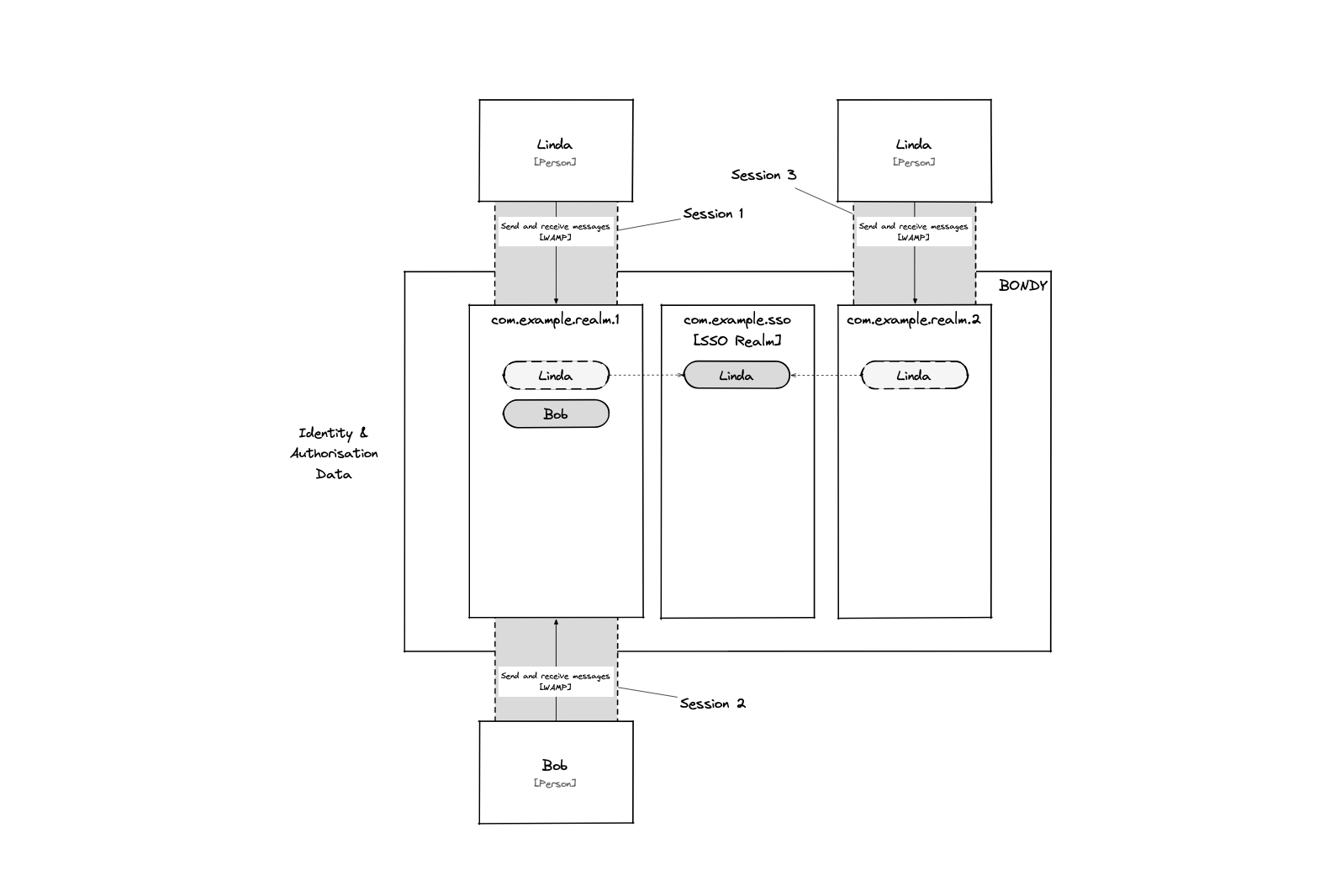
This allows the user Linda to authenticate to both realms using a single set of credentials stored in SSO realm com.example.sso.
Logging-in
There is no need to change the client code to use Same Sign-on. The user can login using its credentials to any of the realms it belongs to.
Changing credentials
Changing credentials (password or authorized_keys) can be done by calling the Bondy APIs while logged-in on any of the realms the user is associated with, Bondy will forward the operation to the linked SSO realm.
Creating local users
Users can still be created normally on any realm (aka a "Local" user). To do this we just create the user without specifying a value for the property sso_realm_uri or setting it to null.
Removing linked users and realms
A linked user has no credentials of its own. It depends on the user of the same name in the SSO realm. The SSO realm also signs the realm's tokens and tickets and holds their revocations. For that reason Bondy refuses these operations with an error:
- Deleting a user from the SSO realm while other realms hold a linked user of the same name. The linked users have to be deleted first.
- Deleting the SSO realm while other realms name it in
sso_realm_uri. - Changing a realm's
sso_realm_uriwhile the realm holds users linked to its current SSO realm.
The two deletions fail with bondy.error.conflict. The change fails with bondy.error.inconsistency_error.
Configuring via a file
The security file format is just the same payload used by the WAMP APIs explained above.
Every time Bondy boots it loads the provided security configuration file and creates each realm in it, as bondy.realm.create does, but in a special mode of operation. Called interactively, bondy.realm.create returns an error when the object already exists. Applied from the file, the same data overrides the stored object.
That is, when using a configuration file Bondy treats it as a declarative configuration statement.
FAQs
Is this the same as Single Sign-on?
No. Same Sign-on still requires the user to authenticate again when opening a session on a realm. It is the combination of Same Sign-on with Ticket authentication method that enables Single Sign-on.
Where does the authorization happen?
Authorization is still performed by the realm to which the user is connecting. This means that the user's permissions will be governed by the local RBAC configuration for that realm. Same Sign-on is only used for authentication.