
Marketplace HTTP API Gateway
A tutorial that demonstrates how to add an HTTP/REST API to an existing project using the HTTP API Gateway.
Goal
In this tutorial we are going to pick up where we left off with the Marketplace tutorial.
The idea is to now expose the Marketplace WAMP API to HTTP. The goal is to demonstrate how one can use Bondy's capabilities to integrate HTTP clients into the a Bondy Application Network.
The steps in the following sections will demonstrate how to create an HTTP API Specification Object from scratch, loading it in Bondy and demonstrating how we can call the resulting HTTP/REST API using an HTTP client.
API Gateway Specification
An API Gateway Specification is a document, a JSON data structure, that declaratively defines an HTTP/REST API and how Bondy should handle each HTTP Request e.g. by converting it into a WAMP operation or forwarding it to an upstream (external) HTTP/REST API.
Background
The architecture remains the same as the one discussed in Marketplace tutorial with the exception that we will now have the HTTP API Gateway and an HTTP client which are shown in the updated view below.
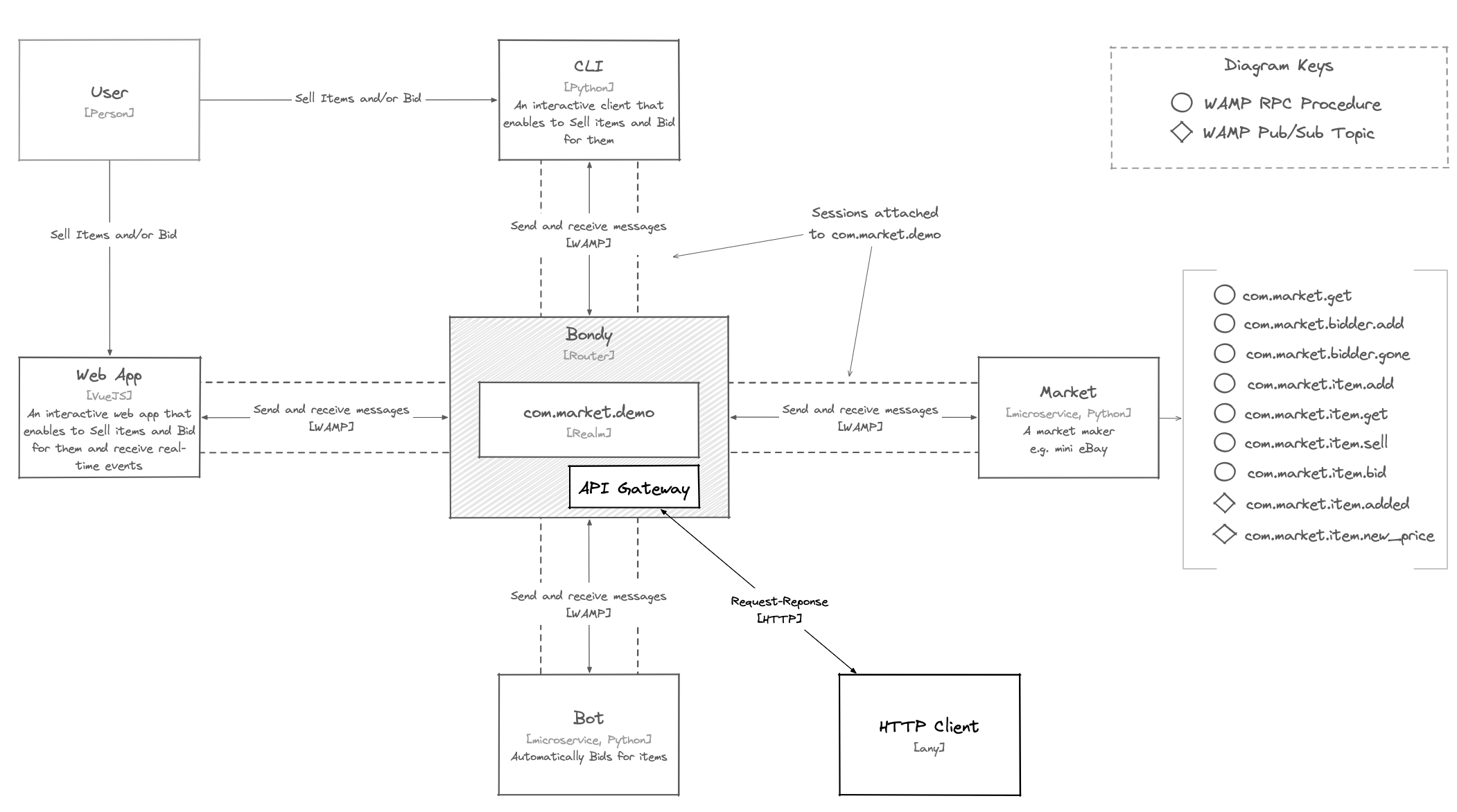
The Marketplace offers the following WAMP API procedures registered on the com.market.demo realm:
com.market.bidder.add- Bind a bidder name to the caller's session. Takes a single positional argument, the bidder namecom.market.bidder.gone- Release the caller's bidder name. Takes no argumentscom.market.get- List the items still open for biddingcom.market.settled- List the items that sold or expired and are still retainedcom.market.item.bid- Place a bid on a listed item. Takes two positional arguments:- item name
- item new price
com.market.item.bids- List the accepted bids on an item. Takes a single positional argument, the item namecom.market.item.get- Return an item's details. Takes a single positional argument, the item namecom.market.item.sell- List a new item for sale. Takes three positional arguments:- item name
- item price
- item deadline (in minutes)
Note
The Marketplace Demo repository configures the com.market.demo realm for OAuth2 authentication. The realm definition is in bondy/etc/security_config.json.template. It:
- adds
oauth2andpasswordto the realm'sauthmethods - adds the users, groups and grants that the OAuth2 flow needs, including:
postman: Postman app user for testing purposes that belongs to theapi_clientsgroupvictor: An end user for testing purposes that belongs to theresource_ownersgroup
make generates the passwords of postman and victor on your machine and writes them to the .env file, as POSTMAN_APP_PASSWORD and VICTOR_USER_PASSWORD.
Make sure you update your local copy of the Marketplace repository to the latest.
Check the realm's authentication methods
The lines highlighted below add the oauth2 and password authmethods.
[
    {
        "uri": "com.market.demo",
        "description": "The market realm",
        "authmethods": [
            "cryptosign",
            "anonymous",
            "oauth2",
            "password"
        ],
        "security_enabled": true,
        ...
    }
]Steps
Run the Marketplace Demo
If you do not have a local copy of the Marketplace Demo repository follow the instructions in the Marketplace tutorial to download it.
Otherwise (assuming the repo it is under your home directory) do:
cd ~/bondy-demo-marketplace
git pullMake sure Docker is running and run the demo by using make.
makeThe demo publishes Bondy's ports on the host with an offset of 10000, so that it can run beside another Bondy node. The API Gateway listener is on localhost:28080 and the Admin API listener on localhost:28081.
Defining an API Gateway Spec
In this part we try to show how we can define an API Gateway Specification to be able to expose some HTTP endpoints that will be mapped to registered WAMP procedures:
Define an API Object
As a first step we need to declare and API Object. In this case we are configuring it with the id com.market.demo on the realm com.market.demo and with oauth2 as security enabled and also some other defaults and configuration.
Lets define a skeleton of our API Object
{
    "id":"com.market.demo",
    "realm_uri":"com.market.demo",
    "name":"Marketplace Demo API",
    "host":"_",
    "defaults":{},
    "meta":{},
    "variables":{},
    "status_codes": {},
    "versions": {}
}In lines 2-3 we are declaring that our API has a unique id com.market.demo and that it will be attached a realm of the same name.
In line 4 we give it a name, this can be anything.
Finally in line 5 we set the host property to the wildcard _. This means that it will match any incoming HTTP request, regardless of the HTTP HOST header value.
Note
In production, you will normally assign the host property the name of your domain or a pattern matching expression e.g. www.example.com or .example.com.
This is key when you have more than one API on different subdomains.
So far this API does nothing as yet we need to define a value for versions.
Define the Versions Object
An API Object has one or more versions of an API. Its versions property takes a mapping from version names to Version Object instances.
Lets start defining a value for versions.
{
    ...
    "versions": {
        "1.0.0":{
            "base_path":"/[v1.0]",
            "variables":{
                "host":"http://localhost:8080"
            },
            "defaults":{},
            "languages":["en"],
            "paths":{}
        }
    }
}Here we have defined a single version called 1.0.0, with the base path segment v1.0.
As it is the only version we want the API Gateway to default to this version every time it handles a request with a path not containing a specific version. So what we want is for request GET /path/to/resource to be equivalent to GET /v1.0/path/to/resource. We achieve that by using the expression /[v1.0] where the brackets mean "optional" as you can see in line 5.
Now lets add the actual HTTP/REST API content.
Define a Path Object
We define the actual paths of our HTTP/API using the Path Object with the proper HTTP method, action type, WAMP procedures, arguments and responses.
The snippet below does implements the HTTP equivalent of the WAMP procedure com.market.get using the /market. This call doesn't require any args nor kwargs.
{
     ...
     "versions": {
         "1.0.0":{
             ...
             "paths":{
                "/market":{
                    "is_collection":true,
                    "options":{
                        "action":{

                        },
                        "response":{
                            "on_error":{
                                "body":""
                            },
                            "on_result":{
                                "body":""
                            }
                        }
                    },
                    "get":{
                        "action":{
                            "type":"wamp_call",
                            "procedure":"com.market.get",
                            "options":{
                            },
                            "args":[
                            ],
                            "kwargs":{
                            }
                        },
                        "response":{
                            "on_error":{
                                "status_code":"{{status_codes |> get({{action.error.error_uri}}, 500) |> integer}}",
                                "body":"{{action.error.kwargs |> put(code, {{action.error.error_uri}})}}"
                            },
                            "on_result":{
                                "body":"{{action.result.args |> head}}"
                            }
                        }
                    }
                }
             }
         }
     }
}HTTP Resource Collections
In line 8 you will notice the property is_collection is given the value true. This is required so that the API Gateway can return the correct HTTP codes for the operations. In this case, this is true, as /market invokes com.market.get which returns a list of items.
Loading the API Gateway Spec
The demo repository holds the complete specification in bondy/etc/api_gateway_config.json, and Bondy loads it at boot through the api_gateway.config_file key of bondy/etc/bondy.conf. To load the specification again after you change it, use the Bondy Administrative API. Run this command from the root of the demo repository:
curl -X "POST" "http://localhost:28081/services/load_api_spec" \
-H 'Content-Type: application/json; charset=utf-8' \
-H 'Accept: application/json; charset=utf-8' \
--data-binary "@bondy/etc/api_gateway_config.json"When Bondy loads the specification, the response has an empty body. When the load fails, the response body is an error payload that names the error.
From the Bondy side, you can see in the logs the following lines:
2022-12-06 10:48:11 bondy | when=2022-12-06T13:48:11.600576+00:00 level=notice pid=<0.1855.0> at=bondy_http_gateway:rebuild_dispatch_tables/0:225 description="Rebuilding HTTP Gateway dispatch tables" node=bondy@127.0.0.1 router_vsn=1.0.0
2022-12-06 10:48:11 bondy | when=2022-12-06T13:48:11.604499+00:00 level=info pid=<0.1855.0> at=bondy_http_gateway:load_stored_spec/2:722 description="Loading and parsing API Gateway specification from store" node=bondy@127.0.0.1 router_vsn=1.0.0 name="Marketplace Demo API" id=com.market.demoExecution and test
Getting an oauth token (JWT) using password method
Request. Run it from the root of the demo repository, so that the shell reads the generated passwords from
.env. Thepostmanclient authenticates with HTTP Basic, andvictoris the resource owner.bashsource .env curl --location --request POST 'http://localhost:28080/oauth/token' \ --user "postman:${POSTMAN_APP_PASSWORD}" \ --header 'Content-Type: application/x-www-form-urlencoded' \ --data-urlencode 'username=victor' \ --data-urlencode "password=${VICTOR_USER_PASSWORD}" \ --data-urlencode 'grant_type=password'Copy the
access_tokenvalue of the response into a shell variable. The requests below send it as a Bearer token:bashTOKEN='<access_token>'Response example
json{ "access_token": "eyJhbGciOiJFUzI1NiIsInR5cCI6IkpXVCJ9.eyJhdWQiOiJjb20ubWFya2V0LmRlbW8iLCJleHAiOjkwMCwiZ3JvdXBzIjpbInJlc291cmNlX293bmVycyJdLCJpYXQiOjE2NzAzMzQ2ODAsImlkIjoxMjEwNjU1ODA2NTU3MzIsImlzcyI6InBvc3RtYW4iLCJraWQiOiI4MzMwOTAxMSIsIm1ldGEiOnsiZGVzY3JpcHRpb24iOiJWaWN0b3IgZW5kIHVzZXIgZm9yIHRlc3RpbmcgcHVycG9zZXMifSwic3ViIjoidmljdG9yIn0.fQ0Ctl9RV4TYzfcusHy1f6aDuqIVuMkffx08vJ9dFq-x8at3fdZR3alCrF1I2lYT5vJFA7YJqjHPb-rbDB2Y1A", "expires_in": 900, "refresh_token": "tlI4SzKqVsjcUsXYCXXmA2JkjAKZ1T7QSX5GB5Or", "scope": "resource_owners", "token_type": "bearer" }
Invoking an endpoint using Bearer Token method with the retrieved token above
Example
/market/itemendpoint trying to sell a new itemRequest executing a POST method
bashcurl --location --request POST 'http://localhost:28080/market/item' \ --header "Authorization: Bearer ${TOKEN}" \ --header 'Content-Type: application/json' \ --data-raw '{ "name": "first item", "price": 1, "deadline": 1 }'Response where the item was published successfully
jsontrue
Example of
/marketendpoint trying to retrieve the market itemsRequest executing a GET method
bashcurl --location --request GET 'http://localhost:28080/market' \ --header "Authorization: Bearer ${TOKEN}"Response
json[ { "deadline": "2022-12-06T14:06:10.306988+00:00", "name": "first item", "price": 591, "winner": "Mary" } ]
The API has no endpoint for bidding or for bidder names. A bidder name belongs to the WAMP session that claims it, and the API Gateway uses one session for each authenticated user. Bid over WAMP, as the bots and the Web App do.
Invoking an endpoint with invalid credentials. Bondy answers with HTTP status
401and an error payload in the body.Using an old token with an inexistent user we have the following response:
json{ "uri": "wamp.error.no_such_principal", "code": "wamp.error.no_such_principal", "handle": "A007", "nature": "permanent", "message": "The request failed because the authid provided does not exist.", "description": "", "details": {}, "causes": [], "doc_uri": "/errors/A007" }Using an expired token we have the following response:
json{ "uri": "bondy.error.invalid_grant", "code": "invalid_grant", "handle": "G003", "nature": "permanent", "message": "The access or refresh token provided is expired, revoked, malformed, or invalid.", "description": "The provided authorization grant (e.g., authorization code, resource owner credentials) or refresh token is invalid, expired, revoked, does not match the redirection URI used in the authorization request, or was issued to another client. The client MAY request a new access token and retry the protected resource request.", "details": {}, "causes": [], "doc_uri": "/errors/G003" }
Conclusion
It is very easy to configure and expose an HTTP/REST API on top of an existing WAMP API. We can do it by using a declarative specification language based on JSON and without any coding.
As a reference, you can see the resulting HTTP API Specification file at api_gateway_config.json.
Finally, you can check the complete Marketplace Postman Collection.
