
Configuration Basics
Learn about the Bondy runtime configuration, the Bondy configuration file, its syntax, variable replacement and the required OS-specific configuration.
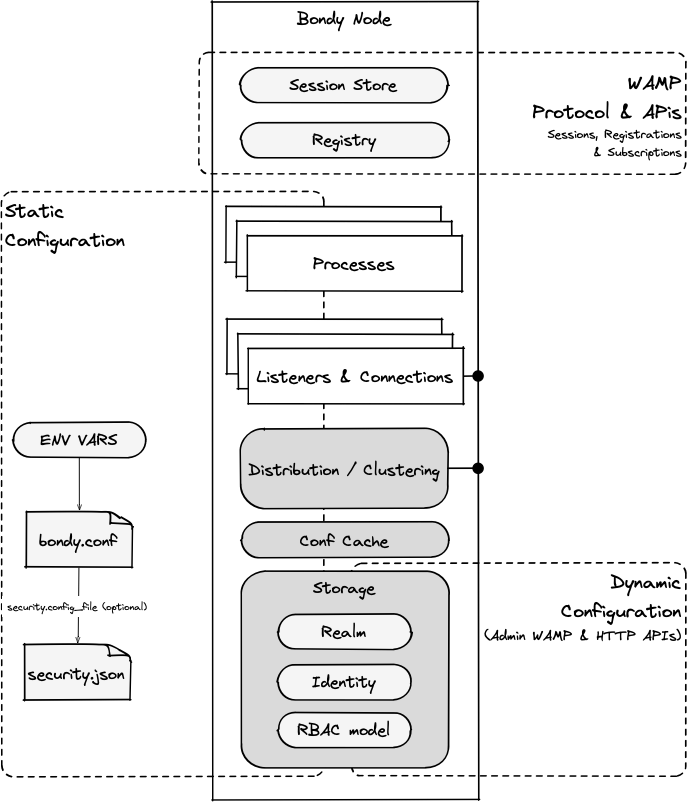
The complete behaviour of Bondy is defined by the combination of 3 types of "configuration" data:
- Bondy node runtime configuration, which controls things like network listeners, availability of optional services, security defaults, clustering and load regulation. This is mostly static configuration done by modifying the
bondy.conffile and a set of environment variables. - Multi-tenancy security configuration, which controls the definition of realms and its security including user identities, authentication and authorization policies, Same Sign-on and Single Sign-on. This is done dynamically via the Admin API. However, it can also be configured via the
bondy.conffile. - RPC and Pub/Sub configuration, a.k.a Control Plane, which defines the available RPC procedures–their invocation policies e.g. load balancing–and PubSub subscriptions and their respective routing information. This is dynamic configured by clients and maintained in the Registry via WAMP.
The following diagram shows the scopes and mechanism for managing each configuration type:
Documentation Scope
This reference documentation covers only the Bondy node runtime configuration using environment variables and the bondy.conf file.
To learn more about Multi-tenancy security configuration check the WAMP and HTTP references.
As opposed to other application networking options i.e. Service Mesh, in which services are configured using a proprietary API e.g. Istio APIs and YAML for Kubernetes resources, Bondy RPC and Pub/Sub configuration is entirely managed by WAMP.
Bondy environment variables
Bondy will use the following environment variables to configure the node identity and the paths it uses to store data.
| Variable Name | Description | Default |
|---|---|---|
BONDY_ERL_NODENAME | Name of the Bondy node. | bondy |
BONDY_ERL_DISTRIBUTED_COOKIE | Erlang distributed cookie to be used to connect a remote shell to a Bondy node | bondy |
BONDY_ETC_DIR | The directory that holds bondy.conf. The Bondy process needs read and write access to this directory. | See File Location section below |
BONDY_DATA_DIR | The directory where Bondy will store its embedded database. Check the relevant requirements in the Operating System Configuration section below | ./data |
BONDY_LOG_DIR | The directory where Bondy will write any defined logs | ./log |
BONDY_TMP_DIR | The directory where Bondy will store any temporary data | ./tmp |
BONDY_RUNTIME_DIR | The directory for runtime objects that need a filesystem with Unix domain socket support. It holds the internal admin socket. See platform_runtime_dir. | ./run |
Notice
In previous version of Bondy these options where configured using the bondy.conf file but that introduced certain issues with the configuration system.
The Bondy configuration file
Bondy configuration file, named bondy.conf, is used to set a wide variety of node runtime configuration options.
During node startup, Bondy will check the existence of the file, parse it and validate its contents. In case of a syntax or validation error, Bondy will stop printing the reason to standard output.
If a configuration file is not found at the expected location, Bondy will create one using default values.
Cluster deployment
When deploying a Bondy cluster it is vital that the same bondy.conf file is used with all nodes.
File Location
The default file location depends on the installation method you've used as shown in the following table.
| Installation method | Default Location |
|---|---|
| Source tarball | /etc/bondy.conf |
| Official Docker image | /bondy/etc/bondy.conf |
The location can be overridden using the BONDY_ETC_DIR environment variable.
File Syntax
The file uses a sysctl-like syntax that looks like this:
# comment
key = valueNote that blank lines are ignored, and whitespace before and after a key or value is ignored, although a value can contain whitespace within. Lines which begin with a # are considered comments and ignored.
The documentation for each key defines the acceptable datatype and format for each value and the default value (if any).
Value Datatypes
The following are the set of acceptable datatypes used in the documentation.
| Type | Description | Example |
|---|---|---|
string() | Any string. Although each token might add specific formatting rules via the documentation | 100 |
integer() | An integer | 100 |
bytesize() | Work pretty much like duration but with three differences. The units are MB, KB and GBIf not unit is specified, the value defaults to bytes You can only use one unit. Lowercase units (i.e. gb, mb, and kb) are ok, but mixed case are not. That's to avoid confusion with Megabits | 1KB |
flag() | Equivalent to a boolean value | on | off |
time_duration_units() | Durations are fixed intervals of time, the largest unit of which will be a one week. Anything larger will have to be expressed in terms of weeks, since larger units (month, year) are of variable duration. The following units are supported: - f: fortnight- w: week- d: day- h: hour- m: minute- s: second- ms: millisecondYou can use any combination of these. | 1w2d |
ip() | An IP address and port pair | 127.0.0.1:8098 |
path() | A file or directory path. The configuration system reads it as a string and does not check that the path exists or is writable. | $(platform_etc_dir)/cacert.pem |
Example
cluster.enabled = off
security.allow_anonymous_user = offDefault values
For every option not provided by your configuration, Bondy might define a default value (check the default value for each key in each Configuration Reference section).
How options and their defaults are documented
Take the following snippet of the Cluster section as an example.
It defines the key cluster.peer_port, which takes an integer value and defaults to 18086. The entry's description then states which values are acceptable.
TIP
Start a Bondy node without providing a configuration file and inspect the one generated by Bondy once the node has started. Bondy would have created the file using the default values. You can copy this file and use it as template to make your modifications.
When you are done copy your modified file to the expected location and start Bondy again.
Variable Substitution
Within the bondy.conf file you can use the following variables which Bondy will substitute before running.
platform_etc_dir
The following is an example of how to use variable substitution.
broker_bridge.config_file = $(platform_etc_dir)/bb_conf.jsonUser environment variable substitution
If you want to use environment variables in the bondy.conf you have to rename the file to bondy.conf.template.
During startup, Bondy considers all files with suffix .template for OS variable substitution and if successful results in a new file of the same name stripped of the .template suffix and where all environment variables have been replaced.
The syntax for environment variables is ${VAR_NAME}.
Notice the BONDY_* variables mentioned above will always be used by Bondy.
Example
security.allow_anonymous_user = off
security.config_file = ${BONDY_SECURITY_CONF_FILE}Operating System Configuration
Open file limits
Bondy can accumulate a large number of open file handles during operation — the storage backend's periodic merges of data files are normal and expected. Raise your system's open-file limit to accommodate this: see How to Raise Bondy's Open File Limit for the OS-specific steps.